
Store search: a ten-minute test of whether shoppers find the product
Author: WebGoodPeople, E-commerce development and support team
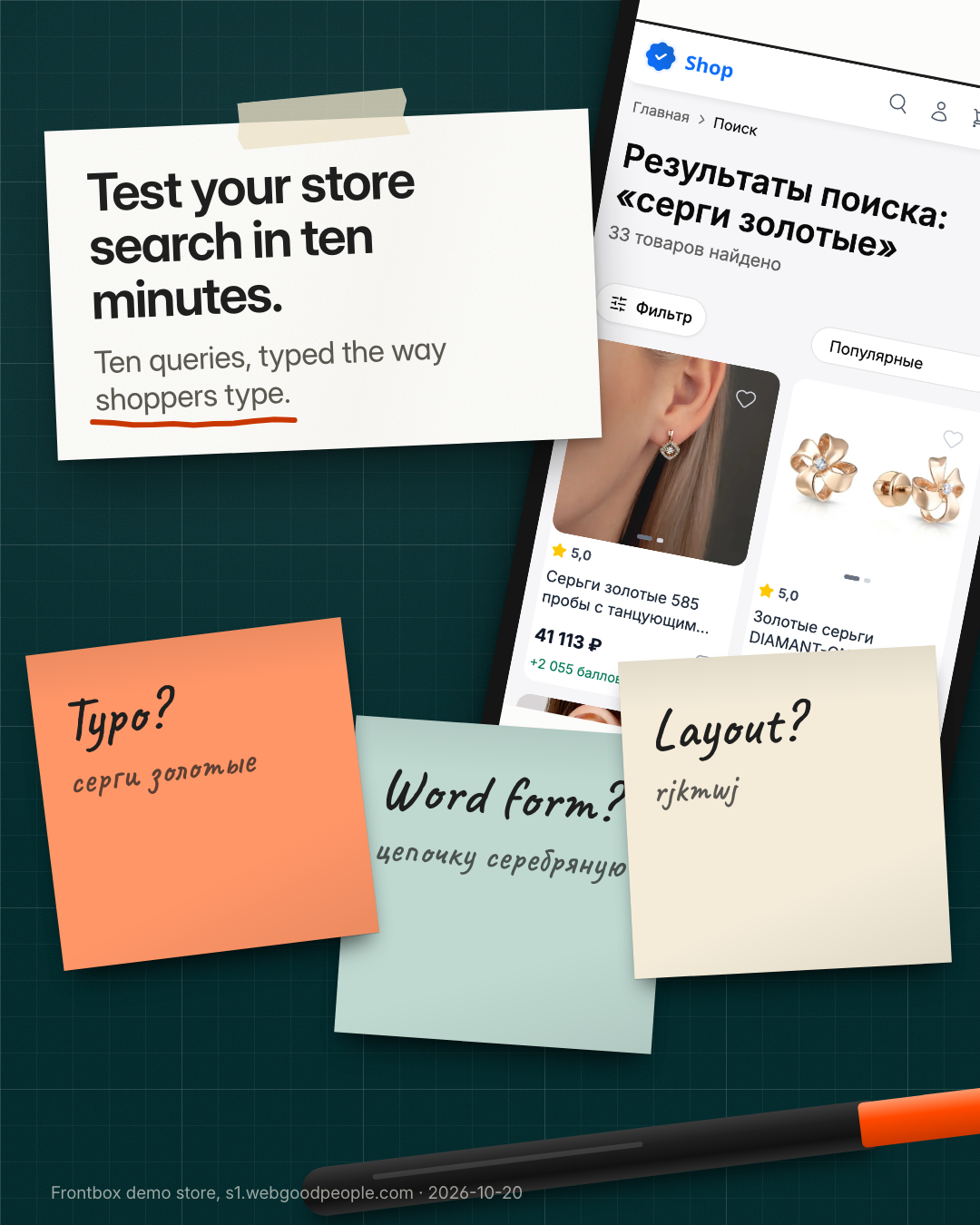
In short. Shoppers search in their own words and on a phone, not the way a product is named in the catalog. You can check whether your store search handles this in ten minutes: write ten queries based on your own products and see whether the right product appears in the top five results.
The product name is written by a content manager or comes from an export. The search query is typed by a person on the go. Between those two texts there are typos, other word forms, abbreviations, product codes without a hyphen and brand names in another alphabet. If search does not bridge that gap, the product is in the catalog but not for the shopper.
Ten queries
Pick two or three popular products and write queries for them. The example below is for a jewelry store, like our Frontbox demo store.
- The exact name from the product page: "gold earrings 585".
- The product code exactly as on the page.
- The same code written differently: lower case, without a hyphen, with a space.
- A one-letter typo: "gold earings".
- A word typed with the wrong keyboard layout (common in Russian stores: Latin letters instead of Cyrillic).
- A colloquial word or synonym the buyer would use.
- A different word form: plural, another case.
- A query with a specification: "ring size 17".
- A brand in two spellings.
- A product that is definitely not in the catalog.
How to test
Open the store on a phone and search from the header like a regular shopper. Press search and save a screenshot of the first screen of results. A query passes if the right product is in the top five. If it shows up lower or only in a suggestion, mark it separately: the shopper may miss it.
This is what the test looks like on our demo store (captured on 20 October 2026, the store is in Russian). The query "серги золотые" with a typo in the word "earrings" returns 33 products, earrings first. The query "цепочку серебряную", "silver chain" in the accusative case, returns 17 products: a silver chain first, a silver bracelet second. Both pass: the right product is in the top five.
The tenth query has its own rule. A blank "nothing found" page is a weak answer. A good one offers a spelling hint, popular categories or a way to contact the store.
Why search misses the product
There are usually two causes, and it matters not to mix them up.
Data. If the product code or attribute is empty, no search will find the product. This is fixed in the catalog or in the inventory system, not in the site code.
Search rules. Typos, keyboard layout, word forms and synonyms are search settings: morphology, a synonym dictionary, layout correction. This is work for a developer or for a dedicated search service.
To tell the two apart, open the product page that search missed. You will see at once whether the code or the word is there.
A ten-minute checklist
- pick two or three popular products;
- write ten queries for them from the list above;
- run them on a phone and save screenshots;
- mark where the right product is not in the top five;
- for every miss, open the product page: is it the data or the search rules;
- pass the list to your content manager (data) or developer (rules).
Limitations
This is a snapshot: search changes after site updates and catalog exports. Ten queries do not replace your store's search statistics. They show whether there is a problem, not how big it is. The size shows up in a "queries with no results" report, if your search keeps one.
What next
If the misses are in the search rules, they can be fixed without replacing the site. We sell Site Search separately: from 990 RUB a month, as a 1C-Bitrix module, a widget or an API, with catalog sync from a feed. If the whole storefront needs replacing, look at Frontbox.
Try the search on our demo store (in Russian). If you ran the checklist on your store and cannot tell whether it is the data or the search, write to us: send the store link and two or three queries that failed.
Read next
Articles on adjacent topics — from real projects.
Write separate messages for different customer needs
A practical framework for testing messages built around different customer situations, from choosing a next step to recording inquiries and interpreting limited evidence.
Blog · October 26, 2026Keep an experiment journal for better store decisions
A blank experiment journal for store changes, with guidance on preparation, incomplete evidence, measurement problems, and the basis for the next action.
Blog · October 21, 2026When you do not need Frontbox
An honest guide from the team behind Frontbox: six cases where a new storefront on top of 1C-Bitrix is not needed, what to choose instead, and the signs that Frontbox is worth a look.
Newsletter
Headless migrations & AI pilots, unpacked
Every 2 weeks — real cases, numbers and architecture decisions. No marketing noise.